Backtesting vs Live Trading: How to Test Your Algo Safely
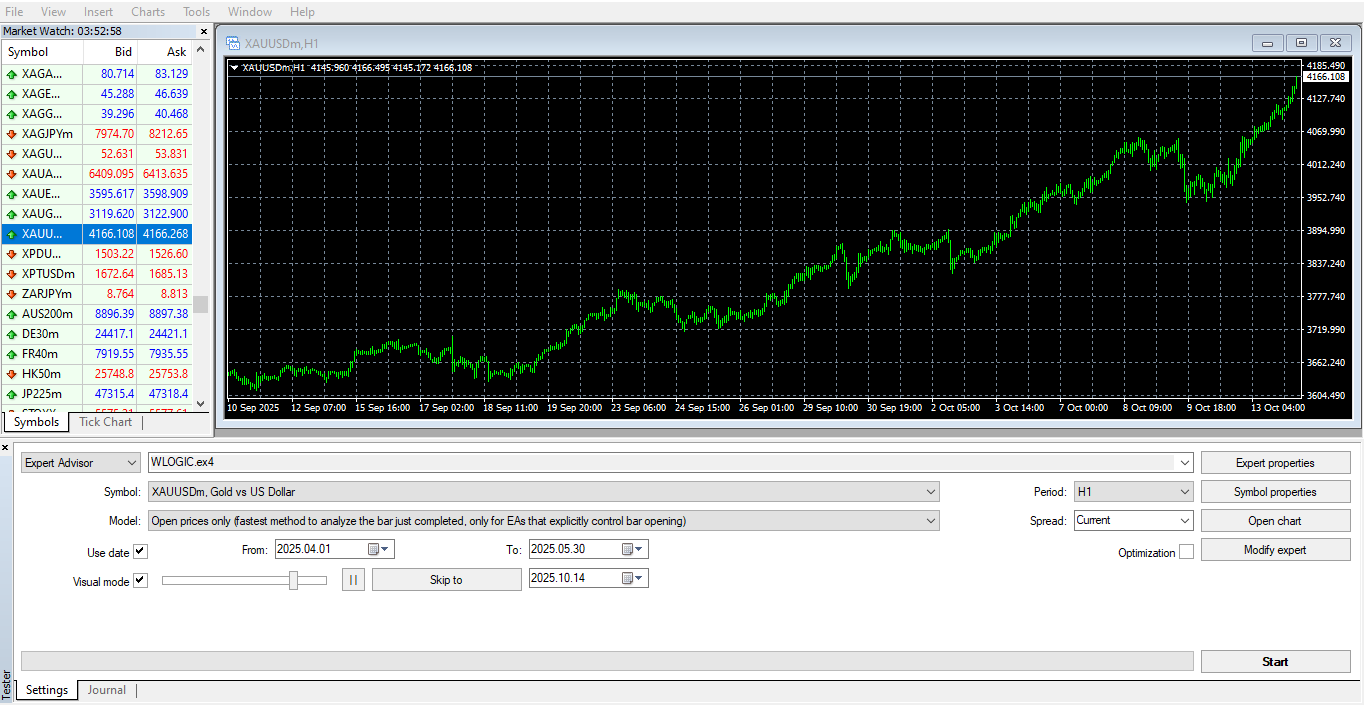
Before risking real money, every trader should test their trading bot (EA) using reliable backtesting strategies and live testing methods. Whether you’re using MQL4 or MQL5, proper testing helps ensure your algorithm behaves as expected under real market conditions. In this post, we’ll explore how to perform both backtesting and live testing safely — and how SolveSphere can help you automate and optimize your trading software.
1. Why Testing Matters in Algorithmic Trading
In algorithmic trading, every millisecond and calculation matters. Even the smallest coding mistake or wrong parameter can destroy months of profit. That’s why testing — both backtesting and live trading simulation — is essential.
- Validate your trading strategy logic.
- Identify bugs or flaws before trading live.
- Optimize parameters for consistent performance.
- Reduce drawdowns and emotional trading mistakes.
Many traders lose money not because of a bad strategy, but because they never tested it properly. By using software development for backtesting, you can transform raw trading ideas into reliable automated bots.
2. What Is Backtesting in MT4?
Backtesting is a technique to simulate your trading strategy using past price data. It helps you understand how your Expert Advisor (EA) would have performed historically. This process is the first stage of any professional trading bot development.
- Runs your EA on historical price data.
- Measures profitability, win rate, and drawdown.
- Optimizes lot sizes and indicator parameters safely.
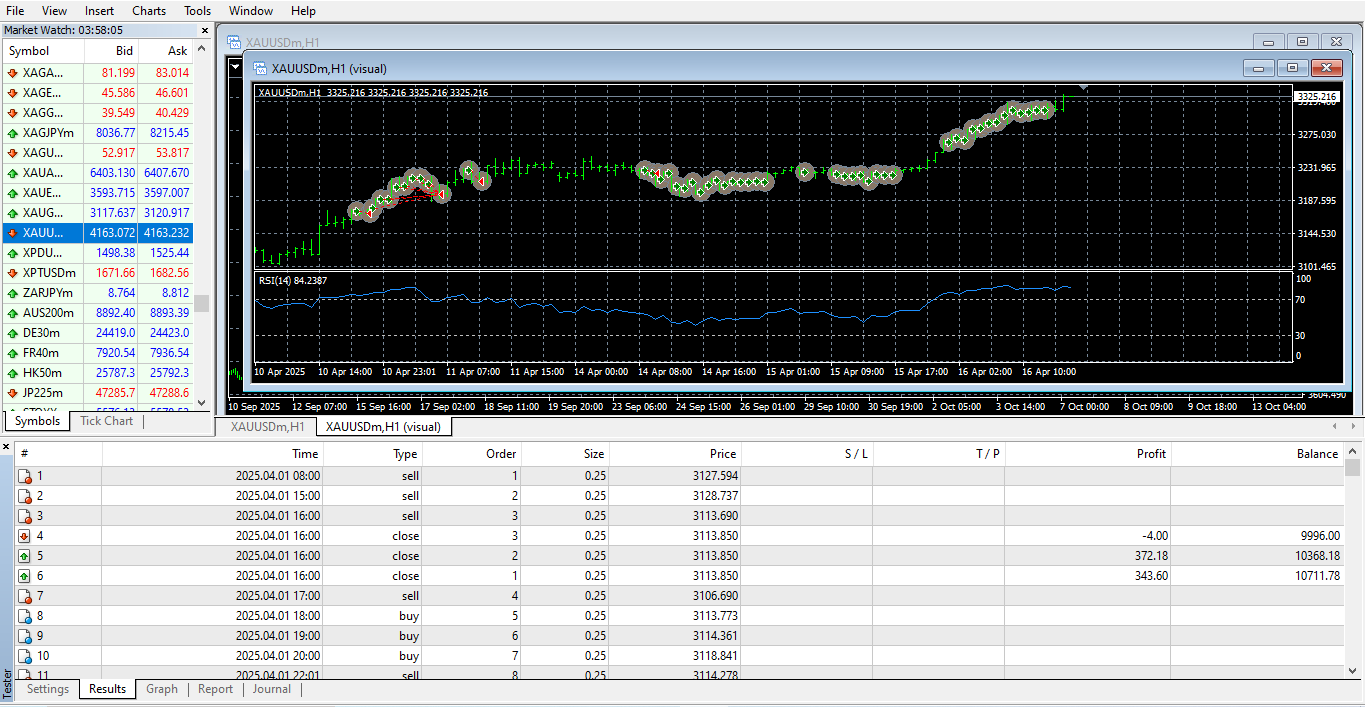
3. How to Backtest an EA in MT4 (Step-by-Step)
If you’re using MetaTrader 4, follow these steps to backtest your trading bot:
- Open MetaTrader 4.
- Press Ctrl+R to open the Strategy Tester.
- Select your Expert Advisor (EA) from the dropdown list.
- Choose the currency pair (e.g., EURUSD) and desired time period.
- Set the testing model (Every Tick is most accurate).
- Adjust parameters such as deposit, spread, and timeframe.
- Click Start to begin the test.
After backtesting, review the detailed report — it includes graphs, equity curves, and statistics. Use this information to identify if your algorithmic strategy is profitable or needs improvement.
4. Key Metrics to Analyze During Backtesting
| Metric | Description |
|---|---|
| Profit Factor | The ratio of total profit to total loss. A value above 1.5 indicates strong profitability. |
| Drawdown | The largest drop in equity. Keep it below 25% for risk safety. |
| Win Rate | Percentage of profitable trades. Aim for 60%+ for consistency. |
| Expected Payoff | Average profit per trade — measures efficiency of your trading algorithm. |
5. Best Backtesting Software and Tools
While MT4 has an excellent built-in tester, you can use additional backtesting software to enhance accuracy:
- Tick Data Suite – Offers 99% modeling quality for professional-grade results.
- Forex Tester 5 – A standalone platform for realistic trade simulation.
- Soft4FX Simulator – Allows manual testing with realistic chart replay.
- SolveSphere EA Optimization Service – Customizes and tests your EA logic for best performance (see our service).
6. What Is Live Testing?
Live testing (or forward testing) means running your EA on current market data — either using a demo account or small live funds. This helps you measure your bot’s performance under real-world conditions, including spreads, latency, and broker execution.
For beginners, it’s highly recommended to use a demo account for at least two weeks before going live. Brokers like Exness and IC Markets provide fast execution and are ideal for algorithmic trading.
7. Backtesting vs Live Trading (Detailed Comparison)
| Feature | Backtesting | Live Trading |
|---|---|---|
| Data Type | Historical Data | Real-Time Data |
| Execution | Simulated, Instant | Broker-dependent (Latency, Slippage) |
| Risk Level | No Financial Risk | Real Money at Risk |
| Control | High Control Environment | Unpredictable Market Behavior |
| Optimization | Fully Customizable | Limited |
8. Common Mistakes During Testing
- Using incomplete or low-quality historical data.
- Ignoring broker spreads and slippage effects.
- Testing for too short a period (less than one year).
- Over-optimizing parameters (“curve fitting”).
- Not simulating real trading commissions.
9. Improving Your Testing Accuracy
Here’s how to make your testing more realistic and reliable:
- Use 99% tick data for historical simulation.
- Include realistic spreads, swaps, and commissions.
- Test in multiple market conditions (ranging, trending, volatile).
- Run optimization on different timeframes.
- Validate results using both MT4 and MT5 versions.
10. The Role of Software Development in Backtesting
Backtesting isn’t only about pressing a button — it’s a full process that requires software development for trading algorithms. At SolveSphere, our developers use MQL4, MQL5, and Python to create bots that can be tested, optimized, and scaled for any trading logic.
We help traders with:
- Designing and coding custom Expert Advisors (EAs).
- Developing backtesting-friendly trading software.
- Integrating advanced analytics and optimization tools.
- Building AI-powered algorithmic trading systems.
Want to create your own trading bot? Visit our Custom Algo Trading Bot Development page and share your trading idea with us. We’ll turn your logic into a fully functional EA.
11. Free Backtesting Resources for Beginners
- Download Free MQL4 Trading Bot – Test our example bots risk-free.
- Learn to Build a Simple Moving Average Bot.
- MT4 Setup and Chart Configuration Guide.
12. Frequently Asked Questions (FAQ)
Q1: Can I make my own trading bot for free?
A: Yes! You can start with our free trading bot examples and modify them using MQL4. For advanced strategies, our team can code custom bots for you.
Q2: Is backtesting enough before going live?
A: No. Always perform both backtesting and live demo testing before trading with real funds.
Q3: What’s the best software for backtesting?
A: MT4’s built-in Strategy Tester is great, but for professional accuracy use Tick Data Suite or hire experts like SolveSphere to automate it.
13. Conclusion: Test Smart, Trade Safe
Backtesting is not just a tool — it’s a discipline that separates professionals from beginners. It helps you validate your algo trading strategies, refine your entries and exits, and minimize losses before going live. On the other hand, live testing brings real-time learning and exposes your bot to market dynamics that backtests can’t simulate.
At SolveSphere, we help traders worldwide design, test, and deploy reliable automated trading systems. Whether you want to build your own algorithm or need professional EA development, our team will help you every step of the way.
👉 Mail us today to get your trading idea automated into a tested, profitable trading bot.
14. Next Step
Continue learning in our next post — How to Connect Trading Logic to Automated Software in MT4/MT5.
Backtesting builds confidence. Live trading builds mastery. Always test before you trade.